
ChordInk is a text input based web application to create good looking, functional chord sheets. The basic idea sprung from the wish of having a way of writing sheets that would mimic the handwriting process, often the fastest way when you're in a hurry, and would not have the distractions of the added functionalities of a full notation software. Being text input based, once you learn the syntax, you can just use your favorite note taking app and create your own library, even write directly on it and just use ChordInk to convert your text into a chord sheet.
ChordInk has a number of functionalities that are inspired by my own process of creating chord sheets by hand. I sifted through my sheets and took note of everything I needed to display the chords and the structure of a song. This is what I took from that and implemented inside the app:
I made this for myself first. For many years I found myself having to transcribe a considerable number of songs for gigs and subbing gigs, often in a hurry. Most times I started that whole process in a notation software, in order to have good looking and clear sheets, plus the ability to transpose for future projects, but inevitably completed the job by hand due to time costraints. After trying a number of solutions I surrendered to the idea that none of those suited my needs better than a notation software did. So I started thinking about this years ago, and started developing it in 2024. I would say that this is mostly for gigging musicians that need to transcribe lots of songs and perform them in different contexts, sometimes in different keys with each band or singer. It can also easily be used in a teaching enviroment.
ChordInk is free. But it's on its infancy stage, so any feedback or ideas for future development are welcome. If you find it useful for your work, you could donate whatever amount to support this project using the links in this site, I'll be grateful for any contributions.
Cheers,
Aurelio Tarallo,
Musician and teacher
The header can contain the following elements:
@pages:2
@title:Yesterday
@author:Beatles
@style:Ballad or @style:(Ballad)
Full header example:
@pages:2 @title:Yesterday @author:Beatles @style:Ballad
A simple | acts as a regular barline.
| G | F |
Different barline types can be created by adding a number before the right barline of the measure.
Example:
| C 4| G 5|
Following any type of barline with a lower case b creates a line break. Following any type of barline with bb creates a bigger line break. Line breaks are not automatic: they must be set manually.
| C | F 2|b
| G | C 3|
The time signature is written inside the song measures with @time. The first time signature written sets the global time signature. If you write a new one later in the chart, the spacing changes from that point onward.
| @time:4/4 G D | C |
| @time:3/4 Am Dm | G |
The time signature is especially important when using rhythm notation, because rhythmic spacing depends on it.
The chord input works by writing the root note of a chord followed by chord quality symbols.
Gm
Cmaj7
Gm7
Gm7b5
Gdim or Gdim7
Gm9, C69, D13
G7#11, D7b9
Cadd9, Fsus4
F/G
Inside a measure, a comma creates an empty rhythmic chord space. This is useful when you want to place a chord on a later beat.
| C , , G | F |
In this example, C is placed at the beginning of the measure and G later in the measure.
Inside a measure, the % sign creates a bar repeat symbol.
| C | % | F | % |
Line breaks, space breaks and spacing between rows are set manually.
Blank staves and tabs work like spacing functions. They create empty rows that can be used for handwritten notation after printing or with a digital pen.
These elements can be stacked if you need more than one line.
ChordInk includes text elements that mimic the experience of writing notes on a chord sheet by hand.
The box is used to add text outside of chord rows. It keeps line breaks as you write them. You can use it for lyrics, notes, explanations, or song structure.
If you put text inside square brackets in a box, it appears as a marker.
@box: [Verse]
[Pre-Chorus]
[Chorus]
[Solo] On chorus changes
If you write regular text after a marker, it appears as normal text next to it.
@txtL, @txtC and @txtR support these special symbols:
Square brackets inside @txtL can be used for endings.
| @txtL:*[1]* C D | @txtL:*[2]* C G |
To the right of the chord sheet you will always see the transposition buttons:
This is a fast and straightforward system. It is designed for practical chord-sheet editing, not for full theoretical spelling in every possible key.
Score blocks are also connected to the same transposition buttons. Notes inside score blocks are transposed according to the written key signature and accidentals. Chords inside score blocks are transposed as well.
Below the transposition buttons there are two more buttons:
These buttons are used to move selected chords slightly left or right. This is useful when rhythm notation is present and you need to adjust chord alignment manually.
ChordInk can display simple rhythm notation under regular chord rows. This is useful when you want to show chord hits, rests, accents, syncopations or rhythmic figures without writing a full score.
Rhythm notation is written inside a measure using curly brackets.
| C D {4 r8 8 r2} |
Rhythm tokens are separated by spaces. The old plus-sign syntax still works for compatibility with older files, but the recommended syntax is now space-separated.
| C D {4 88 4} |
Instead of:
| C D {4+88+4} |
The rhythm renderer automatically spaces the rhythm according to the current time signature.
Example:
| C D {4 r8 8 r2} |
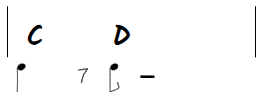
Beamed groups are written by placing the values next to each other as a single rhythm token.
A whole beamed group can be tied by adding t at the end.
| C D {16168t 4 r8 8 168.} |
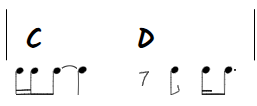
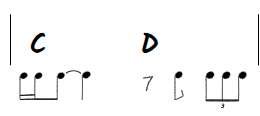
Triplets are written by placing the rhythm group inside parentheses, preceded by the number 3.
Example:
| C D {16168t 4 r8 8 3(888)} |
Rhythm spacing depends on the current time signature. Make sure the correct @time value is written before rhythm notation is used.
| @time:4/4 C D {4 4 88 4} |
| @time:3/4 C D {4 4 4} |
| @time:6/8 C D {88 88 88} |
Rhythm notation is intended for quick chord-sheet notation, not as a complete music engraving system. For more complex notation, use a score block, a blank staff, or dedicated notation software.
The @score block is used to write a short one-line staff directly inside ChordInk. It supports notes, rhythm, optional chords, optional TAB, text markings, repeat barlines, key signatures, time signatures and transposition.
A score block starts with @score and ends with @endscore. Each score block creates one single line of music. If you need more than one line, add another score block.
@score @bars:*2* @time:*4/4* @key:*C* @clef:*treble*
| c4 d e f | g a b c5 |
| 4 4 4 4 | 4 4 4 4 |
@endscore @spacedown:*15pt*
The score header can contain the following parameters:
Example:
@score @bars:*1* @time:*4/4* @key:*G* @clef:*treble*
| f4 g a b |
| 4 4 4 4 |
@endscore @spacedown:*15pt*
Inside the score block, the first line is the note line, the second line is the rhythm line, and the optional third line is the TAB line.
@score @bars:*2* @time:*4/4* @key:*C* @clef:*treble*
| c5 c c c | d e f g |  // notes
| 4 4 4 4 | 4 4 4 4 |  // rhythm
| 2 2 2 2 | 2 2 2 2 |  // tab
@endscore @spacedown:*15pt*
Comments after // are optional. They are ignored by the renderer and are useful only as reminders.
Notes are written using the note name plus octave. The first note must include the octave. After that, the octave is remembered until a new octave is written.
| c4 d e f | g a b c5 |
In this example, d, e, f, g, a and b are understood as octave 4. After c5, following notes remain in octave 5 until a different octave is specified.
The rhythm line uses the same rhythm tokens as regular rhythm notation, separated by spaces.
@score @bars:*1* @time:*4/4* @key:*C* @clef:*treble*
| c4 d e f g|
| 4 88 4 4 |
@endscore @spacedown:*15pt*
The number of note events must match the rhythm events. For example, 88 contains two eighth notes, so it requires two notes in the note line.
In the example above the rhythm line creates five events: one quarter note, two eighth notes, and two quarter note.
Chords can be written inside curly brackets in the note line. They are placed across the measure using the same visual logic as regular ChordInk measures.
@score @bars:*1* @time:*4/4* @key:*C* @clef:*treble*
| {Cmaj7 G7} c4 d e f |
| 4 4 4 4 |
@endscore @spacedown:*15pt*
Two chords divide the measure into two spaces; four chords divide it into four spaces. Use a comma to leave an empty chord slot.
| {C , G7 ,} c4 d e f |
Score blocks support text elements similar to regular ChordInk syntax:
The following symbols are also supported:
@score @bars:*2* @time:*4/4* @key:*C* @clef:*treble*
| @mrk:*Intro* @txtL:*/segno* c4 d e f | @txtR:*/fermata* g a b c5 |
| 4 4 4 4 | 4 4 4 4 |
@endscore @spacedown:*15pt*
Score blocks support the same numbered barline logic used in regular ChordInk rows.
In a score block, the number is written at the end of the measure, before the normal barline.
@score @bars:*4* @time:*4/4* @key:*C* @clef:*treble*
| c4 d e f 4| g a b c5 | d e f g | f e d c 5|
| 4 4 4 4 | 4 4 4 4 | 4 4 4 4 | 4 4 4 4 |
@endscore @spacedown:*15pt*
By default, note stems point upward. You can change stem direction using:
The selected stem direction remains active until another stem direction is written.
@score @bars:*2* @time:*4/4* @key:*C* @clef:*treble*
| @stem:down c5 d e f | @stem:up g a b c6 |
| 4 4 4 4 | 4 4 4 4 |
@endscore @spacedown:*15pt*
The optional third line creates a TAB staff. Instead of writing fret numbers directly, you write the string number. ChordInk calculates the fret from the written note.
@score @bars:*1* @time:*4/4* @key:*C* @clef:*treble*
| c5 c c c |
| 4 4 4 4 |
| 2 2 2 2 |
@endscore @spacedown:*15pt*
In treble clef, the TAB uses six guitar strings:
In bass clef, the TAB uses four bass strings:
If a note is not available on the selected string, ChordInk displays a warning and asks you to adjust the TAB line manually.
Use @ghoststaff in the score header to hide the staff while keeping chords, text elements and TAB visible.
@score @bars:*1* @time:*4/4* @key:*C* @clef:*treble* @ghoststaff
| c5 c c c |
| 4 4 4 4 |
| 2 2 2 2 |
@endscore @spacedown:*15pt*
Use @spacedown after @endscore to add vertical space after the score block.
@endscore @spacedown:*15pt*
Score blocks are connected to the same transposition buttons used for regular chords. Notes are transposed according to the written key signature and accidentals. Chords inside the score are also transposed.
If a TAB line is present, the selected strings remain unchanged and ChordInk recalculates the fret numbers. If a transposed note is no longer available on the selected string, ChordInk shows a warning so that you can choose a different string manually.
If a score block contains a problem, ChordInk displays a warning instead of silently failing.
Score blocks are intended for short examples, riffs, melodies and TAB fragments. They are not meant to replace full notation software, but they are useful for quick music writing directly inside a ChordInk chart.
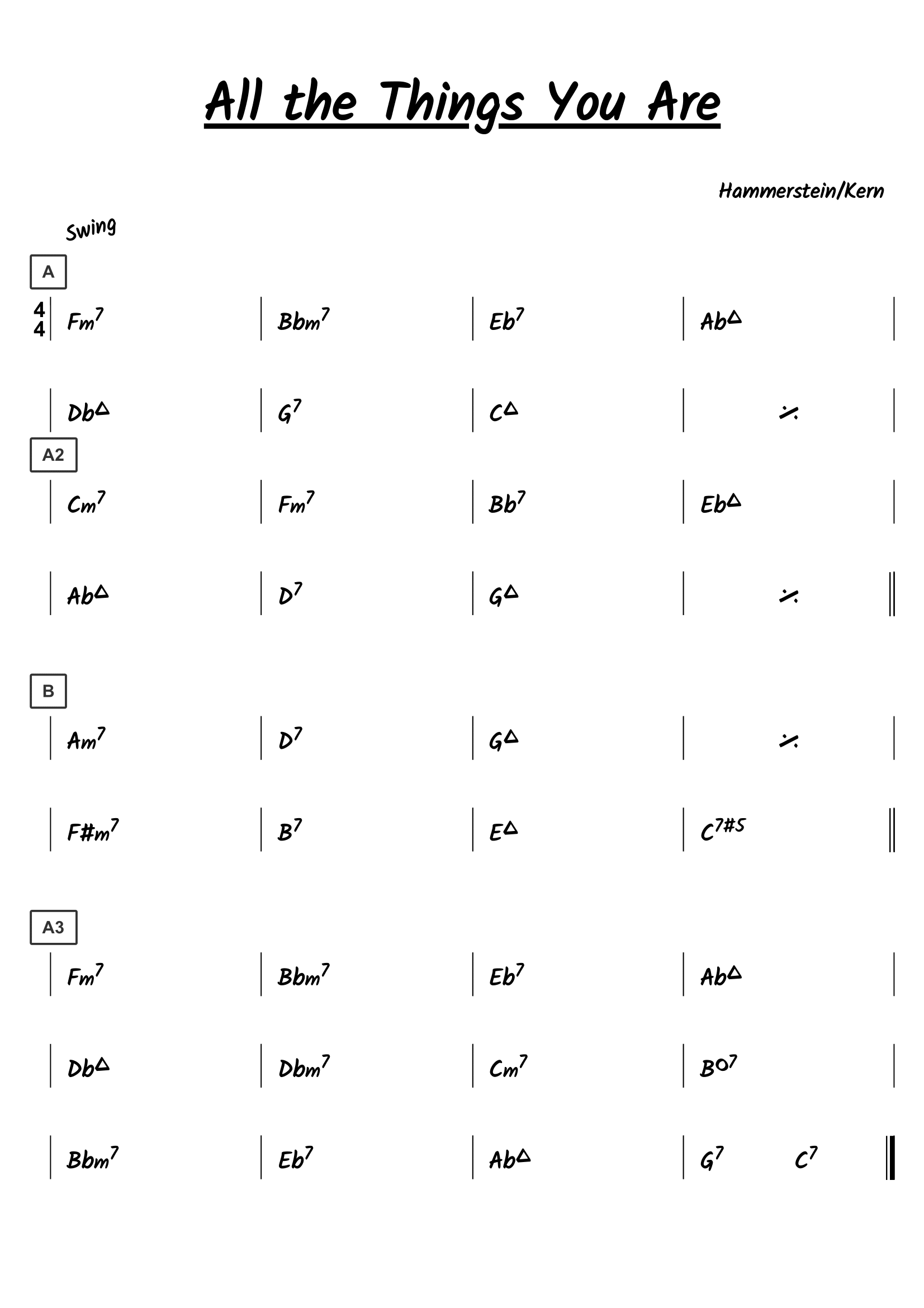
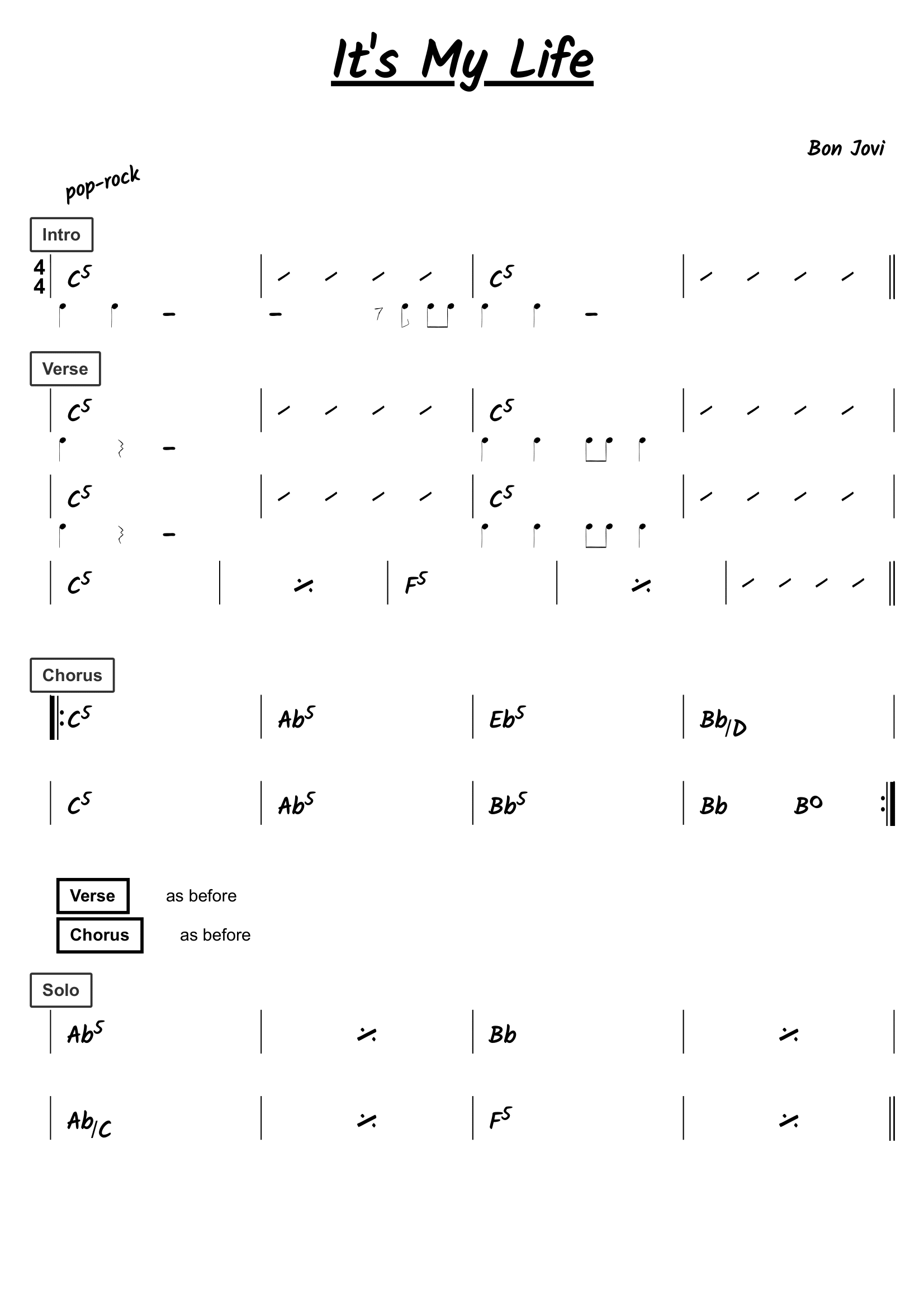
Here's a couple of examples of the code vs the final result
@title:All the Things You Are
@author:Hammerstein/Kern
@style:Swing

|@time:4/4 @mrk:*A* Fm7  | Bbm7  | Eb7  | Abmaj7 |b
|Dbmaj7   | G7   | Cmaj7   | %  |bb
@space
|@mrk:*A2*Cm7  | Fm7  | Bb7  | Ebmaj7  |b
|Abmaj7  | D7  | Gmaj7  | %  2|bb
@space
|@mrk:*B* Am7   | D7  | Gmaj7  | % |b
|F#m7   | B7   | Emaj7  | C7#5  2|bb
@space
|@mrk:*A3* Fm7  | Bbm7  | Eb7  | Abmaj7 |b
|Dbmaj7   |Dbm7   | Cm7  | Bdim7 |b
|Bbm7   | Eb7  | Abmaj7  | G7  C7 3|
@pages:2
@title: It's My Life
@author: Bon Jovi
@style: pop-rock

|@time:4/4 @mrk:*Intro* C5   {4 4 r2}  |  , , , , {r2 r8 8 88} | C5 {4 4 r2} | , , , , 2|bb
@space
|@mrk:*Verse* C5 {4 r4 r2} |  , , , , | C5 {4 4 88 4} | , , , , |bb

|C5 {4 r4 r2} |  , , , , | C5 {4 4 88 4} | , , , , |bb
| C5  | %  | F5 | %  | , , , , 2|bb
| @mrk:*Chorus* C5  4| Ab5  | Eb5  | Bb/D |b
|C5  | Ab5  | Bb5  | Bb Bdim 5|b
@box: [Verse] as before
[Chorus] as before
@space
|@mrk:*Solo* Ab5 |  %  | Bb  | %   |b
|Ab/C  |  %     | F5      |  %    2|b
@pagebreak
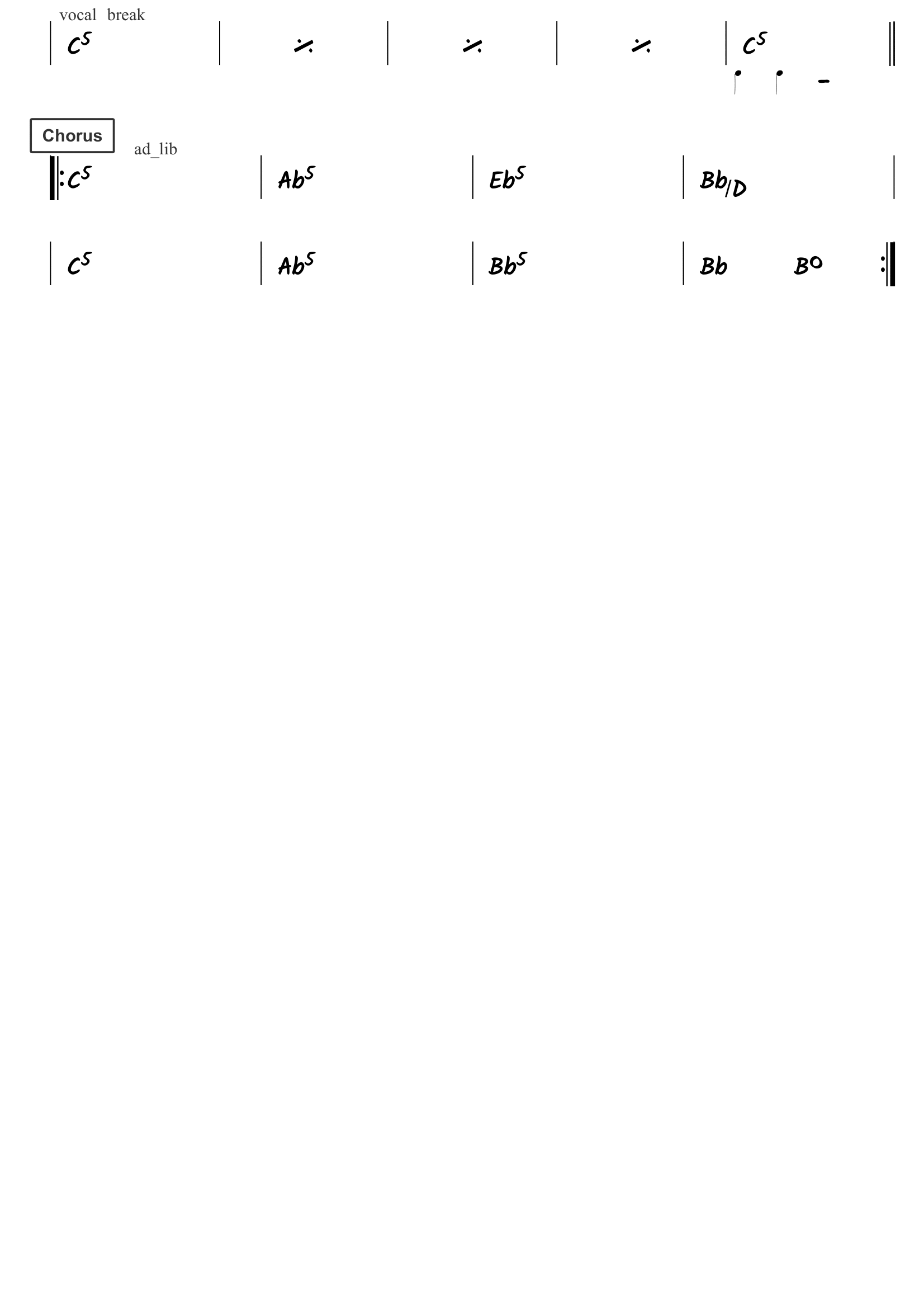
|@txtL:*vocal break* C5 |   %   | %    | % | C5 {4 4 r2} 2|bb
@space
|@mrk:*Chorus* @txtC:*ad_lib* C5  4| Ab5  | Eb5  | Bb/D |b
|C5  | Ab5  | Bb5  | Bb Bdim 5|b
This section is under contruction. It will contain a collection of songs written with ChordInk code
App Overview
A guitar book is on the way! Meanwhile here's some lessons and exercices you can download! (plus a short booklet about harmony for my italian friends)
Here's a few old transcriptions that are good enough to be shared (student years)